![27067777_10155770309551084_2652624411171450813_n.png]](https://support.doradosoftware.com/hs-fs/hubfs/27067777_10155770309551084_2652624411171450813_n.png?height=40&name=27067777_10155770309551084_2652624411171450813_n.png)
You will need your Corporate SMTP server protocols and credentials.
1. Go to Home page -> "Getting Started" Portlet or
Settings-> "Common Setup Task" and locate the
2. SMTP Configuration > Click Edit and enter the values for your environment
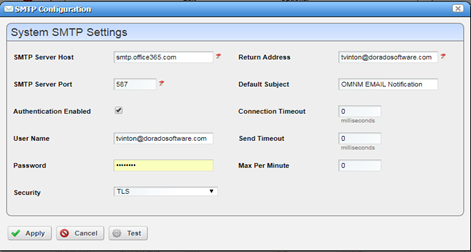
Click Test to test your SMTP Setup.
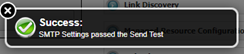
Success notice will appear in upper right-hand corner of the screen.
Alternatively, you may verify by going to: Alarms portlet-> right click -> Email Alarm
SMS/Text in an Automation rule can be sent by specifying the target phone number followed by the recipients provider( for example 9163334444@vtext.com) . Refer to this link for additional provider formats.
Note: If having an issue receiving e-mail, it may be due to incorrect corporate e-mail settings. To rule this in/out, try verifying email using an internet SMTP server account like G-mail.