![27067777_10155770309551084_2652624411171450813_n.png]](https://support.doradosoftware.com/hs-fs/hubfs/27067777_10155770309551084_2652624411171450813_n.png?height=40&name=27067777_10155770309551084_2652624411171450813_n.png)
You can install your new license via GUI or command line:
- Install license via GUI https://support.doradosoftware.com/knowledge/install-license-key
- Install license via command line https://support.doradosoftware.com/knowledge/cmd_licenseimporter
Since the original license has expired:
- You will most likely need to reboot the server or restart appserver/webserver for the new license to take effect.
- After installing the license, the devices will likely be in suspended mode.
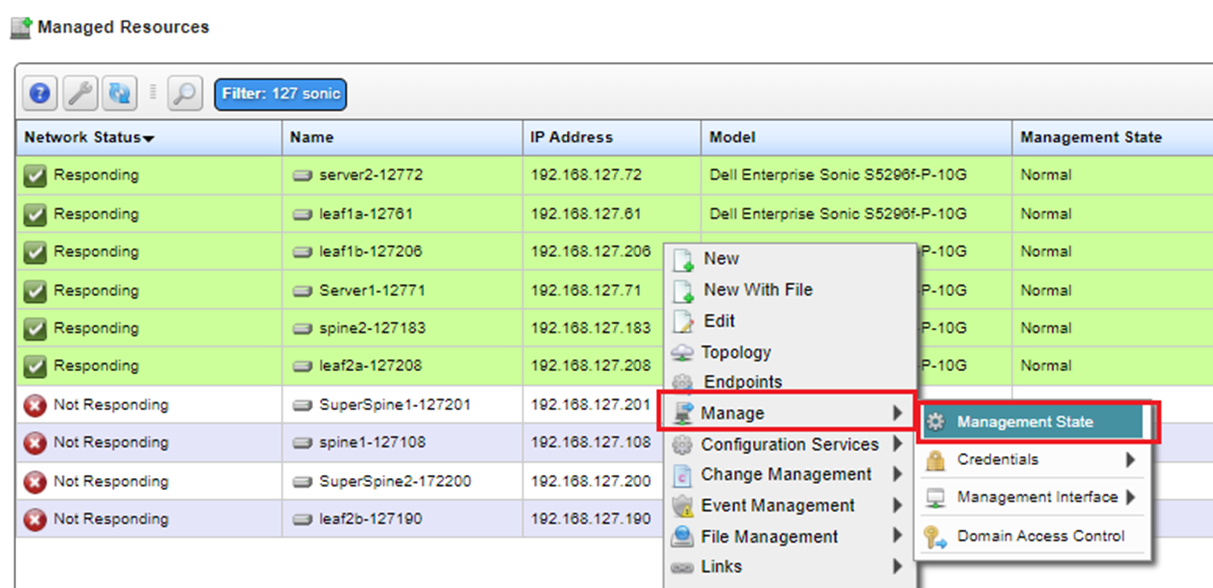
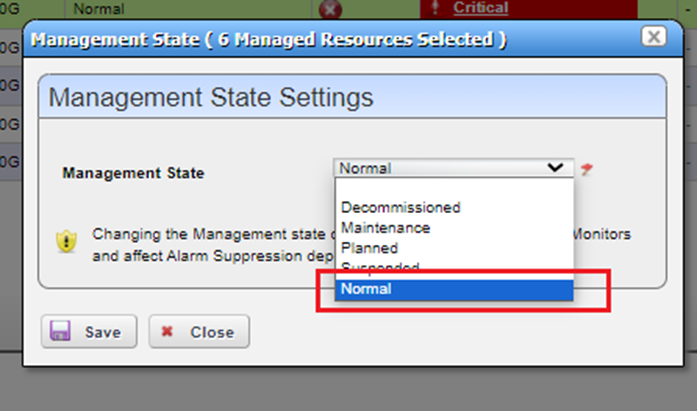
- You will need to select all device in managed resources portlet and right click and select Manage/Management State and select Normal from drop down menu. See images below: