![27067777_10155770309551084_2652624411171450813_n.png]](https://support.doradosoftware.com/hs-fs/hubfs/27067777_10155770309551084_2652624411171450813_n.png?height=40&name=27067777_10155770309551084_2652624411171450813_n.png)
The inspection feature lets you validate the authentication to prepare for successful device discovery.
Go to the Inspection Tab
Click Inspect
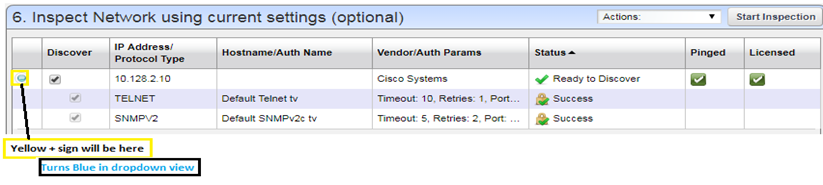
Successful verification will display a status of “Ready to Discover”
Click on the Yellow Icon on the left to view the status of ALL authentications.
If the targets did not have SNMP, the inspection (or direct execution) of the profile will auto-configure SNMP.
See next step: